Best Real Estate Wholesaling Software: 11 Tools by Job
The best real estate wholesaling software fixes the part of your business that's slowing deals down. If you don't have enough seller leads, start with property data and a way to reach owners. If leads are coming in but follow-up keeps slipping, look at a seller CRM. If you have properties under contract and need buyers, focus on dispo.
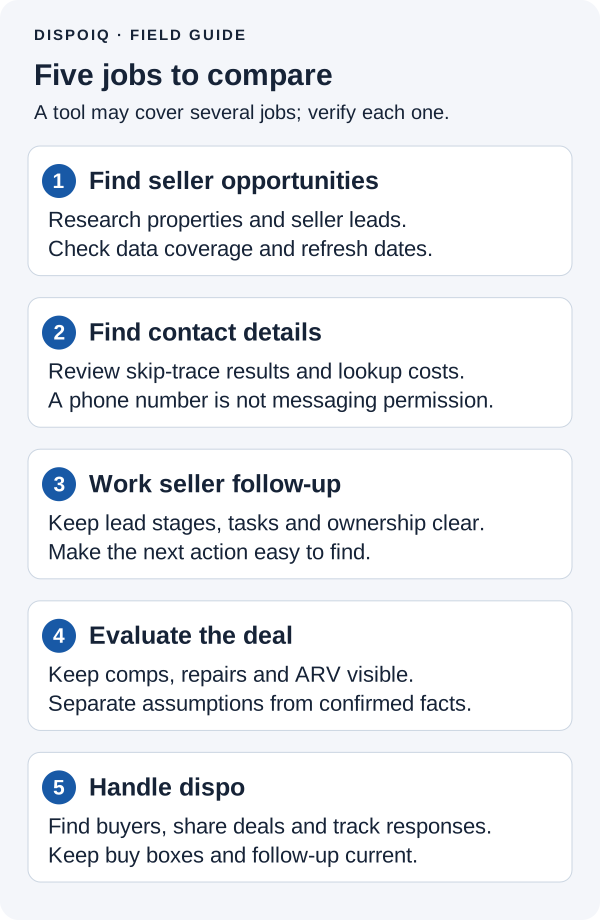
You may need more than one tool, but you don't need to buy everything at once. The 11 products below cover five jobs: finding leads, skip tracing, tracking sellers, running the numbers, and selling the deal to an end buyer.
DispoIQ publishes this comparison and is one of the products included. This is a comparison of published product information, not a hands-on test or a ranking based on customer results.
Choose the job before you choose the software
Start with your last few deals or leads. Where did you lose time? An unanswered seller inquiry calls for different software than a deal sitting unsold because you don't know who to send it to.
| Job | What you need the tool to do | What to check in a demo |
|---|---|---|
| Property data and seller leads | Find properties and owners that fit your strategy | Local coverage, useful filters, record and export limits |
| Skip tracing | Find possible phone numbers and emails for an owner | Included contacts, extra charges, and a way to correct bad results |
| Seller CRM | Track conversations, offers, appointments and follow-up | Who handles the next call, when it's due, and where the notes live |
| Deal analysis | Compare sales and estimate repairs, ARV and your offer | Whether you can review the comps and change the assumptions |
| Disposition and buyer management | Find buyers, send deal details and track interest and offers | Buy boxes, buyer conversations and the next step toward closing |
A product can cover several jobs. Ask the vendor to walk through one of your leads or deals and show where each step happens.
Property data and seller lead tools
These tools help you build a list or research an address. They don't establish that an owner wants to sell. You'll still need to contact the right person and find out whether there's a deal.
The prices and product details below were checked against the linked official pages on October 7, 2026. Billing terms, usage charges and availability can change; confirm the plan you intend to buy.
| Tool | Consider it when | Cost and buying detail |
|---|---|---|
| PropStream | You want property research and filtered seller lists | Essentials is $99/month or $972 billed annually. Check skip-tracing and export allowances, including whether you need the Connect add-on. |
| DealMachine | Driving for dollars and property research are part of your lead strategy | Basic is $99 per seat/month with 10,000 data credits per seat; Pro is $149 per seat/month with 20,000. Driving for Dollars is included; postcards cost extra. |
| BatchLeads | You want list building with phone numbers and emails included | Monthly Growth is $119, Professional $349 and Scale $749. Compare monthly lead/export allowances and included users against what you'll actually work. |
Try the driving-for-dollars workflow or a list search in your target area. A national record count won't tell you whether the results fit your strategy.
If you export leads to another CRM, check who imports them, removes duplicates and assigns follow-up. Include that work in your buying decision.
Skip tracing: compare the allowance, not just the label
Skip tracing looks for contact information tied to a person or entity. Some data subscriptions include it, some charge by contact, and standalone services are another option. You don't have to buy a separate tool if the service in your existing plan meets your needs.
BatchLeads advertises phone numbers and emails on every plan. PropStream lists skip tracing at 12 cents per contact on Essentials, alongside a Connect add-on from $30/month that includes skip tracing. Reikit offers both included skip-traced leads and additional skip tracing, with separate allowances and charges on its pricing page.
Compare the number of contacts you'll work, not the largest allowance available. Ask whether charges apply per submitted record or matched result, whether repeat searches count again, and how business-owner records are handled. A returned number may be wrong or belong to someone else. Confirm who you're speaking with, and don't treat a contact match as permission to send marketing messages.
Seller CRMs: make the next follow-up obvious
A seller CRM should help you answer three questions quickly: what did the seller say, who's handling the lead, and what happens next? This is your acquisitions pipeline, from the first conversation through an offer and signed contract.
| Tool | Consider it when | What to check before buying |
|---|---|---|
| REsimpli | You want seller follow-up and several investing workflows in one platform | Its page describes calling, SMS, email, e-signature, automation and KPI dashboards across plans. Confirm your team-size price, fair-use terms and separately billed AI calling. |
| Reikit | You want seller follow-up, lead tools and deal analysis together | Starter is $64/month, Marketing Success $104/month and Marketing Scale $204/month. Compare lead, message and analysis allowances before estimating the whole bill. |
| Podio | You want to build a pipeline around your own process | The free plan supports up to five users. Paid plans add capabilities; allow for setup, integrations and ongoing maintenance of the workflow you build. |
| CarrotCRM | You want a CRM focused on managing seller leads and team follow-up | Formerly InvestorFuse. Confirm current CarrotCRM pricing, included users, onboarding charges and the calling integrations your team needs. |
Use a real follow-up situation in the demo: a seller isn't ready today but asked you to call next month. Can you assign that call, see the last conversation and stop an automated message when someone replies?
Test a handoff too: can another rep pick up the lead without guessing?
Deal analysis: keep the assumptions visible
Software can collect comps and help calculate an offer. You still need to decide whether the sales are comparable and whether the repair estimate fits the property.
Reikit includes comps, ARV tools and a rehab-cost estimator in its plans. REI BlackBook also lists a deal analyzer among its features. Dedicated calculators and spreadsheets can handle parts of this job too; you don't need a new subscription just because you need to run the numbers.
Keep seller contract price, repairs, ARV and buyer asking price separate. Make clear whether the asking price includes your assignment fee.
For a flip, review comps and the rehab scope. For a rental, examine rents, expenses and cash flow. Look for assumptions you can change, not just a recommended offer.
Dispo tools: find buyers and keep the deal moving
Disposition is getting your wholesale deal sold or assigned to an end buyer. Software can help you find buyers, share deal details and follow up, but it doesn't replace the conversation about price, access, funding and closing.
| Tool | Consider it when | Cost and buying detail |
|---|---|---|
| Wholster | You want marketplace distribution and are considering its property and buyer research tools | Free includes one active listing. Pro is advertised at $69/month or $699 annually, with priority-list access and a launch offer; confirm when you can use it. Bulk exports and contact enrichment have separate usage charges. |
| DispoIQ | You want buyer search, a buyer CRM, deal pages and offer tracking | Pro is $299/month or the $249/month equivalent with annual billing. Scale is $599/month or $499/month with annual billing. Access is through the waitlist. |
| InvestorLift | You want to compare its buyer network and deal distribution tools | Pro lists God Mode access but excludes full Artemis engagement tracking. Confirm market coverage, the tier or add-ons needed, billing term and total cost. |
| REI BlackBook | You want CRM, follow-up and property marketing together | Monthly Basic is $97, Growth $197 and Professional $297. Compare contacts, included messages, user accounts and extra usage charges. |
DispoIQ Pro includes buyer search, buy boxes, engagement tracking and a buyer CRM. Scale adds two-way and bulk texting, a shared SMS inbox, one automatic follow-up and advanced engagement analytics. Messaging uses a prepaid wallet with per-message charges; carrier and 10DLC registration fees are additional. Elite's AI dispositions assistant is on the roadmap and isn't available yet. See the plan details before budgeting.
If your buyers list is thin, compare buyer-search coverage and ask how the tool helps you identify investors buying near your deal. If you already have buyers, concentrate on segmentation, replies and offers. A page open shows activity, not a commitment to buy.
Use the cash buyers list guide to organize relationships, or compare more cash buyer platforms if buyer discovery is your main need.
Free tools and AI: useful starting points, clear limits
Podio's free tier can help you organize a small team's work if you're willing to build the workflow. Wholster's free marketplace tools allow one active listing. Neither free offer should be read as access to every paid feature.
A spreadsheet can hold leads, buyers and follow-up dates. Upgrade when it causes missed calls, duplicate work or unclear responsibility.
For AI, ask what task it performs. PropStream advertises AI search and a property assistant; Reikit describes SmartText AI for messaging. Treat generated text, comps and calculations as material to review. AI doesn't know an unseen repair issue or a buyer's current interest merely because it can produce an answer. Don't budget around DispoIQ's roadmap AI features as if they're available today.
Budget for the whole workflow
Build your budget from your own volume instead of someone else's claimed typical software spend. Write down subscriptions, billing commitments, seats, data charges, calling and messaging, direct mail, onboarding and paid integrations.
Then compare what you're already paying for. Two subscriptions may both include property data, follow-up or skip tracing. Keep both only if each does work your team needs.
Before committing annually, check your workflow, expected usage and contact migration. Start with the clearest gap; add another tool when you can explain the job it will do.
Questions about wholesaling software
What is the best software for wholesaling real estate?
Choose by your immediate need. Property-data tools help you find seller leads, CRMs help you follow up, and dispo tools help you work buyers and offers. Compare the tools within that job before buying a broader bundle.
Do I need separate seller and buyer CRMs?
You need a clear process for both relationships, but not necessarily two subscriptions. A seller pipeline tracks conversations and offers to owners. A buyer workflow tracks buy boxes, deal interest and offers from buyers. Check whether one product handles both well enough for your team.
Can I start without paid wholesaling software?
Yes, you can organize your work with a spreadsheet or suitable free tier. Paid software becomes easier to justify when it solves a problem you can name and includes the features and capacity you need.
If finding buyers and managing dispo is the gap in your business, review DispoIQ's plans and join the waitlist.
If keeping seller leads and buyer follow-up organized is the main problem, use the wholesaling CRM guide. If buyer reach is the problem, compare InvestorLift alternatives and check the software comparison hub for the relevant plan and workflow guides.